Skip to content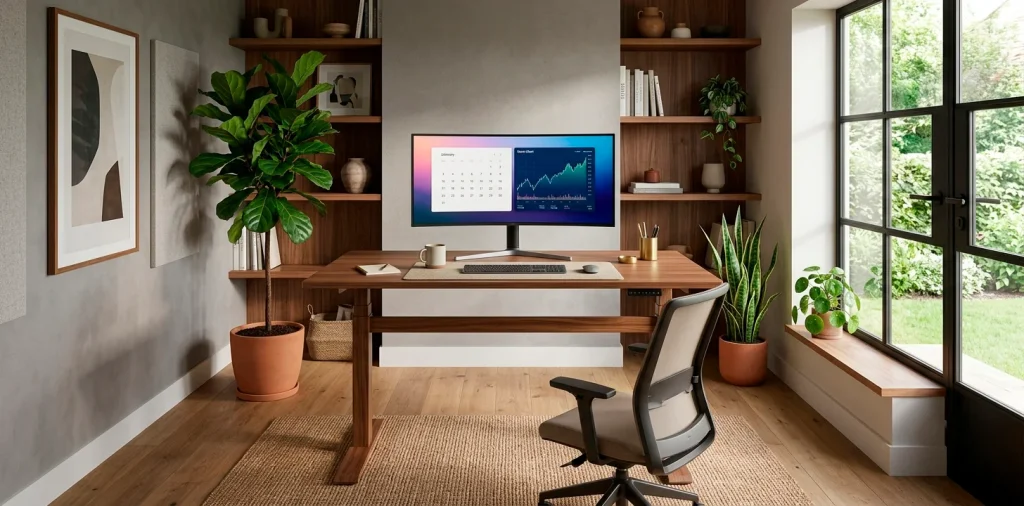
Is your standing desk starting to look like a chaotic web of tangled cables and empty coffee cups? Trust me, I’ve been there. Upgrading to a standing desk is a total game-changer for your posture, but figuring out how to make it actually look good is another story. Let’s fix that mess and create a workspace you actually want to spend time in.
Taming the Cable Chaos
Let’s be real, a floating desk exposes every single wire you own. Cable management is the foundation of any good desk setup. If you skip this step, no amount of fancy lighting or expensive plants will save your aesthetic. You need a dedicated cable tray mounted right under the desk to hide those thick power cords.
I recommend grabbing a pack of reusable velcro ties while you are at it. Just strap those unruly monitor cables to your monitor arm, and route everything straight down one leg. Ever wondered why professional setups look so insanely clean? It is literally just zip ties and patience.

Elevating with Monitor Arms
Why are we still using those clunky factory monitor stands? Investing in a sturdy monitor arm instantly frees up massive amounts of desk real estate. IMO, it is the quickest way to make your setup look incredibly custom and expensive. You can adjust the height precisely to your eye level, which completely saves your neck during those marathon work sessions. Floating your screens just looks undeniably cool, giving you room underneath for a sleek desk pad or a dedicated spot to park your keyboard.
A useful little gift for your home
🎁 Free Plant Finder Tool
Filter 250+ houseplants by style, size, and care level to find your perfect green companion in seconds.
We’ll email you the link. Plus, you’ll join our newsletter for fresh home inspiration.

Nailing the Ergonomic Golden Triangle
Getting the height right is absolutely crucial.
Your elbows should rest at a crisp 90-degree angle when typing. If you are shrugging your shoulders, the desk is too high.
Then there is the screen distance. If you have to lean forward to read an email, push that monitor back right now. Your eyes will thank you.
Finally, grab an anti-fatigue mat. Standing on a flat hardwood floor for hours is essentially a medieval torture device for your heels. A good cushioned foam mat makes standing all day completely effortless, giving your joints the break they truly deserve.

Lighting that Sets the Mood
Overhead lighting is often way too harsh for focused screen work. You need layered lighting to reduce eye strain and build ambiance. A screenbar light resting on top of your monitor illuminates your desk without glaring on the screen itself. Toss a warm, dimmable LED strip on the back edge of your desk for that sweet bias lighting effect. It honestly transforms the entire vibe of the room from a boring corporate cubicle into a cozy, late-night productivity sanctuary. If you share this space, balancing functionality and aesthetics is key, so finding clever ways to blend your home office and guest room becomes a breeze.

Adding Personality with Desk Accessories
Now comes the fun part: styling the actual surface. A massive leather or felt desk pad is a non-negotiable accessory. It anchors your keyboard and mouse while protecting that beautiful desktop finish.
Next, introduce some life into the setup. A small, low-maintenance potted plant adds exactly the right pop of color. I usually kill plants, so a high-quality faux pothos works wonders for me.
Essential desk styling elements:
- A solid wood headphone stand
- A minimalist digital clock
- A wireless charging pad

Storage Solutions for a Minimalist Look
Standing desks are notorious for lacking drawers. Where exactly are you supposed to put your pens, hard drives, and sticky notes? The best fix is an under-desk drawer add-on. These slide right under the tabletop and hide your everyday clutter completely out of sight.
If you need even more space, grab a slim rolling filing cabinet. Just make sure it fits between the desk legs when it is lowered to a sitting position! Nothing is more annoying than your desk crashing into a metal cabinet because you miscalculated the clearance by half an inch. 😅

Final Touches to Keep You Moving
The whole point of a standing desk is to keep your body active. Why not take it a step further? Slip a balance board underneath your desk for some low-impact movement. It keeps your core engaged and prevents you from locking your knees while you answer emails. If you are feeling extra ambitious, an under-desk treadmill is a fantastic way to rack up those daily steps. Just start slow, because typing while walking definitely takes some coordination. Once you lock in this dynamic routine, you will wonder how you ever survived sitting in a static chair for eight straight hours.

The Right Chair Matters Even When Standing
You cannot stand all day. Seriously, do not even try. Mixing sitting and standing is the real secret to avoiding fatigue and keeping your energy high.
An ergonomic drafting chair or a tall active stool is the perfect companion. This allows you to perch comfortably without constantly lowering the desk back to sitting height.
I prefer leaning on an active stool because it forces my posture to stay upright. Plus, it effortlessly slides right under the desk when I am ready to stand again.

Optimizing Sound and Acoustics
Working from home usually means dealing with unwanted echoes or background noise. If your setup is in a large, empty room, your video calls will sound like you are broadcasting from a cave.
Adding acoustic panels behind your monitor dampens the sound and doubles as gorgeous wall art. You can find felt hexagons or sleek wooden slats that perfectly match your aesthetic. They completely elevate the professional vibe of your space.

Mastering the Power Brick Problem
We talked about cables, but what about the giant power strip?
Do not leave it on the floor. It collects dust and ruins the clean look.
Mount a heavy-duty power strip directly to the underside of your desk. This way, only a single cord runs down from the desk to the wall outlet.
FYI, whenever you raise or lower the desk, everything plugged in moves seamlessly with it. It is literally the smartest modification you can make for peace of mind.

A useful little gift for your home
🎁 Free Plant Finder Tool
Filter 250+ houseplants by style, size, and care level to find your perfect green companion in seconds.
We’ll email you the link. Plus, you’ll join our newsletter for fresh home inspiration.
Conclusion
Building a functional and stylish standing desk setup is a process, but the results are absolutely worth the effort. By tackling cable management and upgrading your ergonomics, you create a space that boosts both your productivity and your mood. Which of these awesome desk upgrades are you grabbing first? Let me know in the comments below!